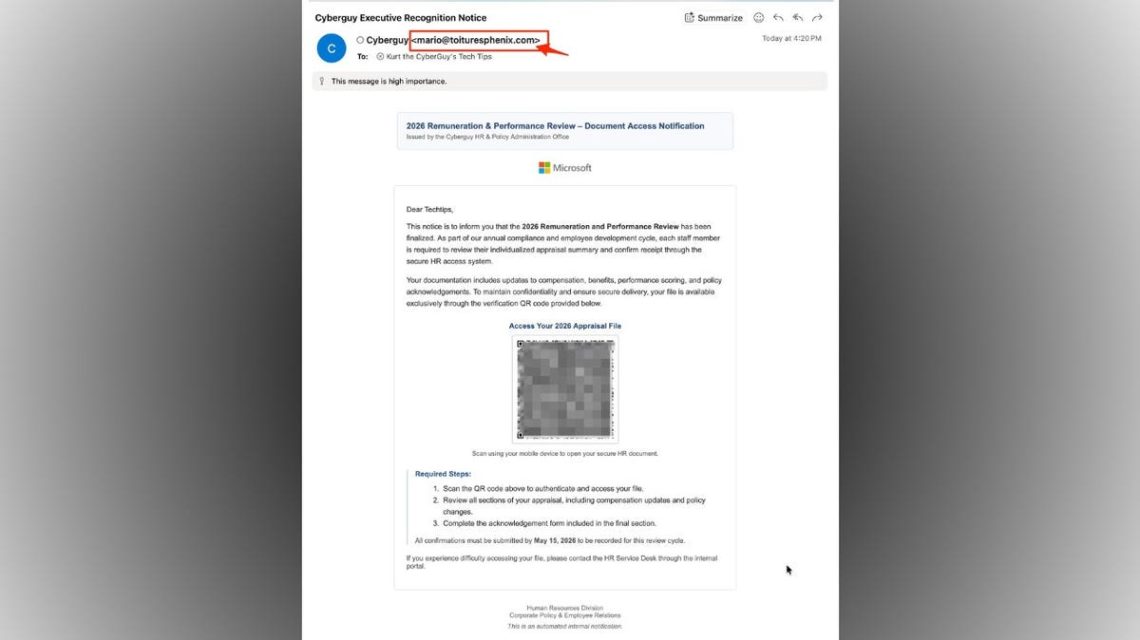
Emails imitating legitimate HR notices can use QR codes to trick recipients into accessing phishing pages. Scams like these may claim to originate from an internal HR office, urging employees to scan a QR code for appraisal access. This tactic is designed to move targets from computer environments, where links are more easily verified, to phones where verification is harder.
Identifying phishing email red flags
These types of emails often contain several suspicious elements. Here’s what to watch for:
- Sender’s email mismatch: Legitimate HR notices will come from a company domain, not a random address like [email protected].
- Urgency through deadlines: Deadlines in suspicious emails aim to rush decisions. True HR notifications may have deadlines, but delivery standards differ.
- QR code as the call to action: This approach is known as “quishing.” Most companies use secure login portals.
- Generic greeting: Personalization is key in legitimate HR emails; vague introductions suggest phishing attempts.
- Vague system language: Authentic notices mention familiar platforms, not undefined systems.
- Unreflective branding: The presence of logos does not confirm authenticity. Legitimate internal emails follow standard templates.
- High-importance markers: These markers increase urgency but should be scrutinized.
- Instructions bypass typical login habits: Secure systems require logging in via known paths, not file access via QR codes.
Why QR code phishing scams are on the rise
QR codes are widely used by restaurants, airlines, and more, giving them an undue sense of safety. Scammers leverage this trust by encoding malicious links. Scanning a malevolent QR code can redirect to phishing sites, potentially stealing login details, downloading malware, or eliciting further personal information.
Protective measures against QR code email scams
Here are steps to defend yourself:
- Do not scan unexpected QR codes: Visit official sites directly rather than using codes.
- Verify sender’s domain: Ensure email addresses align with the company’s domain.
- Use habitual login paths: Navigate familiar URLs, avoiding email-based links and codes.
- Beware of generic greetings: Emails lacking personal identification are often suspect.
- Contact your company for confirmation: Verify discrepancies using known contact methods.
- Install robust antivirus software: This can intercept harmful links and block malware.
Maintaining digital security
Keeping your devices updated and enabling two-factor authentication are critical in fending off phishing attempts. Updating security settings regularly and using trusted antivirus solutions can protect your credentials and data.
Phishing tactics evolve constantly; recognizing and questioning suspicious emails is key. With QR codes becoming more frequent in phishing schemes, a cautious approach can prevent falling prey. Always authenticate through known channels, not urgency-induced paths.
 60 Minutes Correspondents Decide to Stay Amid Crisis
  AI Impact: How AI Search is Transforming Professional Services and IT Budgets
  The Critical Role of Magnets in Modern Drone Warfare
  Rising Energy Demands Drive Innovative Solutions
  SpaceX Market Debut: Elon Musk’s Journey to Trillionaire Status
  The State of Sports Video Game Releases and Player Expectations